
Steam Frame Review: Valve's Standalone Headset Is a Modder's Dream — If You Can Stomach the Price
The Steam Frame ships September 18 at $1,059. It's Valve's answer to Quest — but for the modding and enthusiast crowd, it's something more interesting than a Quest competitor. Here's what it actually offers.
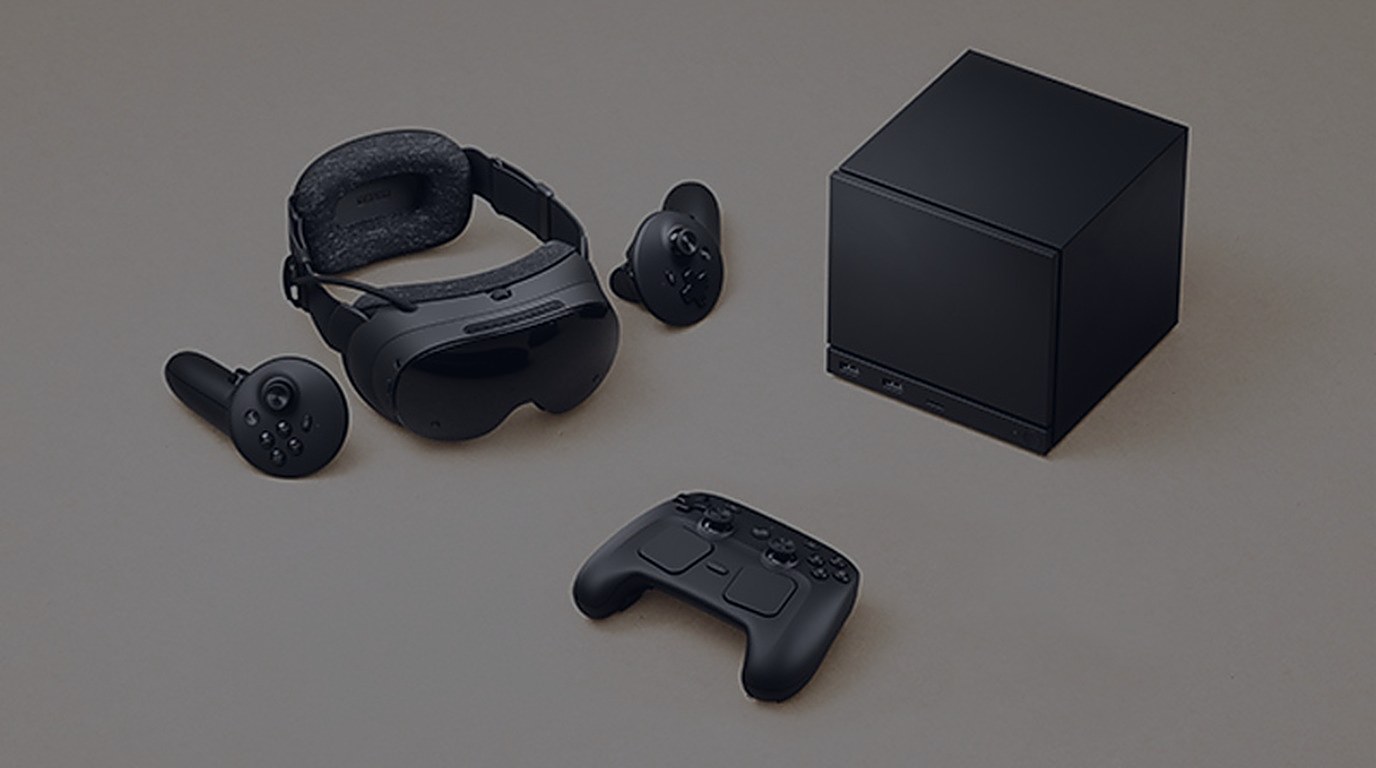
Valve doesn’t do things the way Meta does. That’s been true since the Index, and it’s true now that the Steam Frame is real. Where Meta ships a locked-down appliance and tells you to like it, Valve ships a box with an expansion port, releases the CAD files, and says “figure it out.” The Steam Frame is the first standalone VR headset built by a company that actually wants you to take it apart.
It ships today — September 18, 2026 — at $1,059 for the 256GB model and $1,299 for 1TB. That’s expensive. It’s $260 more than a Quest 3 with the same storage, and it doesn’t include the kind of polished standalone library Meta has spent years building. But the Steam Frame isn’t trying to be a Quest. It’s trying to be an open platform for people who treat VR as a hobby, not an appliance. Whether it succeeds at that is a different question from whether it’s good hardware.
The Hardware
The spec sheet reads like someone took a flagship phone and bolted it to a face gasket. Snapdragon 8 Gen 3. 16GB of LPDDR5X RAM. Dual 2160×2160 LCD panels at 72–144Hz. Inside-out tracking via four monochrome cameras and IR emitters. Wi-Fi 7 with a bundled Wi-Fi 6E USB adapter for dedicated low-latency PC streaming. 440 grams with the strap. Eye tracking. Pancake lenses. Physical IPD adjustment via knob.
None of that is groundbreaking on paper. The Quest 3 has a comparable chipset and resolution. The Pimax Crystal Light has higher resolution. The Bigscreen Beyond is lighter. What makes the Frame different isn’t the individual specs — it’s the combination and the philosophy behind them.
The display is LCD, not OLED. That’s a real trade-off. Deep blacks and HDR contrast aren’t happening here. Valve chose LCD for the pixel density and refresh rate range, and the 144Hz mode (experimental, but functional) is something no other standalone headset offers. For fast-paced VR — rhythm games, shooters, anything where frame timing matters — that headroom is meaningful. The 72Hz floor also means you can dial down for demanding titles without the set chugging.
The tracking uses SLAM-based inside-out, no external base stations required. This is a big departure from the Index, which relied on Lighthouse tracking. Valve clearly decided that standalone means standalone — no boxes on tripods, no cables to the corners of your room. Early reports suggest the tracking is competent but not class-leading. It’s Quest 2-level, which is fine for most things and occasionally frustrating for precise controller work. If you’re coming from Index-level Lighthouse tracking, you’ll notice the downgrade. If you’re coming from Quest, it’s about what you’d expect.
The controllers use tunneling magnetoresistance (TMR) analog sticks — the same tech Valve shipped in the Steam Controller 2. This is a subtle but significant detail. TMR sticks don’t develop drift. The stick drift problem that plagues every other controller on the market — Joy-Con, DualSense, Touch — simply doesn’t exist here. For a community that’s been buying hall-effect stick modules and soldering them into controllers for years, this is Valve quietly solving a problem everyone else ignores.
The button layout also deserves attention. The left controller has a D-pad. The right has four face buttons. This isn’t the standard VR controller layout — it’s closer to a gamepad. Valve designed these to work with non-VR games too. Flat games running natively on SteamOS can use the controllers as a standard gamepad without any remapping. That’s a small thing that speaks to a bigger philosophy: this headset isn’t just for VR.
The Expansion Port
Here’s where the Frame gets interesting for the CompoundVR crowd.
The front of the headset has an expansion port with a PCI Express Gen 4 lane and a MIPI camera interface. Valve has released the CAD files and specifications. Third-party accessories are already in development — Arcturus has a camera accessory using two color sensors for passthrough, video, and 3D capture.
But the port is more than a camera mount. Valve has explicitly stated it can support face tracking, depth sensors, full body tracking, and entirely different tracking solutions. PCIe Gen 4 bandwidth means you could theoretically plug in a custom tracking module with multiple cameras and IMUs and get data rates that nothing on the consumer market currently supports.
Think about what that means for the modding community. Right now, if you want face tracking on a VR headset, you’re buying a Pimax Crystal with their face tracking module or bolting an Index-style face tracker to something it wasn’t designed for. On the Frame, someone can build a face tracking module that plugs directly into the headset with proper bandwidth and official documentation. Someone can build a depth sensor for better passthrough. Someone can build a full-body tracking solution that doesn’t rely on external cameras or base stations.
Valve releasing the CAD files is the part that matters most. Meta’s hardware is a sealed black box — literally. You void your warranty if you open it. Valve is handing you the blueprints and saying “build something.” For the VR enthusiast community, this is the difference between a product and a platform.
The Software Stack
The Frame runs SteamOS — Valve’s Arch Linux-based operating system. This is the same OS that runs the Steam Deck, and it brings the same compatibility infrastructure with it.
Proton handles Windows game compatibility. This is the same Proton that made the Steam Deck a viable gaming device — the translation layer that converts Windows DirectX and Vulkan calls into something Linux can execute. For VR, this means the Frame can run Windows SteamVR titles without a PC. That’s the promise, anyway. How well it works in practice depends on the game, the translation overhead, and whether the Snapdragon 8 Gen 3 can push enough frames through Proton’s translation layer.
Fex provides x86-64 emulation on the ARM CPU. This is the same technology that lets ARM devices run x86 Linux software. For the Frame, it means the Proton translation layer can execute x86 game code on ARM hardware. The performance overhead is real — you’re stacking x86-to-ARM translation on top of Windows-to-Linux translation — but for older or less demanding titles, it should be viable.
Lepton is the wildcard. It’s a fork of Waydroid, providing an Android runtime environment with sideloading support. This means the Frame can run Android apps, including — in theory — Android VR apps built for Quest and other Android-based headsets. Whether this actually works for Quest games depends on how closely Lepton matches the Android VR runtime those games expect. It’s an early-stage project, and the compatibility picture is unclear. But the ambition is obvious: Valve wants the Frame to be able to run software from multiple ecosystems without requiring a PC.
And then there’s Steam Link for wireless PC streaming. The Frame includes a dedicated Wi-Fi 6E USB adapter that creates a direct 6GHz connection between PC and headset, bypassing your local network entirely. Wi-Fi 7 handles the internet connection on separate radios. Valve calls this multi-link streaming — the adapter and local Wi-Fi run simultaneously, so you can download updates while streaming a game without either task cannibalizing the other’s bandwidth.
What This Means for Modders
The CompoundVR audience doesn’t buy hardware for the default experience. They buy it for what it becomes after the community gets hold of it. The Steam Frame is the first standalone headset that’s been designed with that audience in mind from day one.
The expansion port is the headline, but the software story matters just as much. SteamOS with Proton means the modding tools that work on desktop VR — REFramework, Luke Ross’s R.E.A.L., custom shader fixes, dll injectors — have a path to running on standalone hardware. Not a guaranteed path. Not an easy path. But a path that doesn’t exist on Quest, where Meta controls what runs and how.
The CAD files mean the hardware itself is moddable. Want to design a custom facial interface with better ventilation? The specs are public. Want to build a battery pack that clips onto the expansion port? The electrical interface is documented. Want to create a custom tracking solution that uses the MIPI camera interface for something Valve didn’t anticipate? The bandwidth is there.
This is the difference between modding a product and building on a platform. Quest modding is an act of reverse-engineering — figuring out how to make things work that weren’t designed to. Frame modding is an act of engineering — building things that the hardware was explicitly designed to support.
For anyone who’s fought with Air Link’s finicky network requirements, this is a meaningful improvement. Dedicated hardware, dedicated frequency, no contention with your other devices. If the encoding latency is competitive with Virtual Desktop — and Valve has the engineering talent to make that happen — this could be the best wireless PCVR solution available.
The Standalone Question
Here’s the uncomfortable truth: the Frame’s standalone library is going to be thin at launch.
SteamOS with Proton can run a lot of Windows games, but “can run” and “runs well enough for VR” are different things. The translation overhead is significant, and the Snapdragon 8 Gen 3, while powerful for a mobile chip, isn’t a desktop GPU. Demanding VR titles — Half-Life: Alyx, Boneworks, the newer Unreal Engine 5 showcases — are going to struggle or simply not work.
The Android runtime (Lepton) opens the door to Quest-compatible apps, but that door is early and creaky. Don’t expect the Quest Store library to magically appear on the Frame.
What the Frame can do standalone is run lighter VR titles, emulators, and indie games through Proton and Fex. Beat Saber clones, rhythm games, older VR titles that don’t need ray tracing, retro games through emulators. The Frame is a Steam Deck that goes on your face, and the Steam Deck’s standalone library is proof that a lot of games work through translation layers.
The Wi-Fi 6E adapter is the real play for most buyers. The Frame’s standalone library is a nice bonus, but the primary use case is going to be wireless PC streaming for the first year or more. You’re buying a wireless Index replacement, not a standalone Quest killer. The standalone capabilities are a bet on Valve’s translation stack maturing — and given what Proton accomplished on the Deck, that’s not a bad bet.
The Price Problem
$1,059 is a lot of money for a VR headset, and the Frame doesn’t come with the kind of polished standalone library that justifies that price for casual buyers.
The Quest 3 is $499 and has hundreds of optimized standalone games, a mature PCVR streaming ecosystem, and years of software refinement. The Frame has better hardware, a more open platform, and a better PCVR streaming solution — but it doesn’t have the library, the polish, or the installed base.
For the CompoundVR audience — people who already own a gaming PC, who mod their games, who tinker with settings and configuration files — the Frame makes sense in a way it doesn’t for everyone else. You’re paying a premium for openness, expandability, and the Valve ecosystem. You’re paying for the expansion port and the CAD files and the TMR sticks and the Wi-Fi 6E adapter. You’re paying for a platform that doesn’t tell you “no.”
For the casual VR buyer who just wants to play Beat Saber and watch Netflix in VR, the Quest 3 is the better buy. It’s cheaper, it has a better standalone library, and it just works. The Frame asks you to be patient while the software catches up to the hardware.
Who Should Buy This
The Steam Frame is for the VR enthusiast who’s already modding, already tinkering, already treating VR as a hobby rather than an appliance. If you’re the person who bought an Index for Lighthouse tracking, who’s soldered hall-effect sticks into controllers, who’s running custom firmware on tracking pucks — the Frame is built for you. The expansion port alone makes it the most interesting piece of VR hardware released in years.
It’s also for the wireless PCVR convert who’s tired of Meta’s ecosystem. If you’ve been running Air Link or Virtual Desktop and wishing for a more open, more hackable, more enthusiast-friendly wireless solution — and you have the gaming PC to back it up — the Frame delivers that.
It is not for the person who wants a turnkey standalone VR experience right now. The software isn’t there yet. The standalone library is thin. The translation layers are early. Buy a Quest 3 if you want to put on a headset and play great games immediately.
The Bottom Line
The Steam Frame is Valve doing what Valve does: shipping interesting hardware with an open philosophy and trusting the community to build something with it. It’s not the best standalone headset you can buy today — the Quest 3 is more polished, more affordable, and has a better library. But the Frame is the most important standalone headset released in years, because it’s the first one that treats its users as collaborators instead of consumers.
The expansion port, the CAD files, the TMR sticks, the open SteamOS stack — these aren’t just specs. They’re a statement about what VR hardware should be. Whether the software catches up to the vision is the open question. But for the first time, the modding community has a VR headset that was designed to be modded.
That’s worth $1,059 if you’re the kind of person who was going to take it apart anyway.